Eligibility details in context
As a case manager, I want to review eligibility-stage details (workflow, missing docs, checklist) without leaving the case so that I don’t lose context by jumping to the Eligibility dashboard.
What this enables
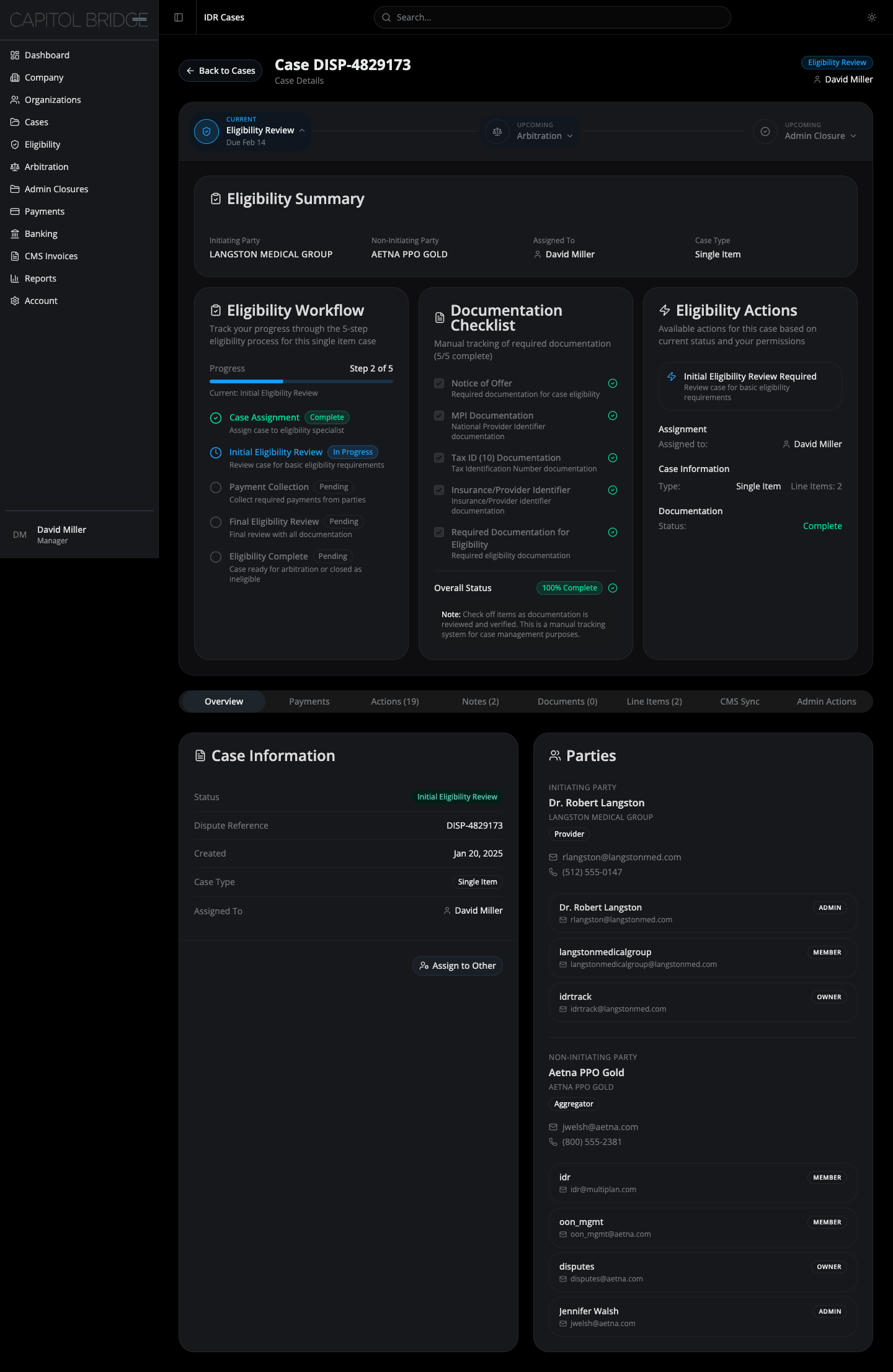
Section titled “What this enables”Clicking the Eligibility Review node opens an inline panel inside the same card as the stepper. The manager sees the eligibility summary, missing-documentation banner (when applicable), the five-step workflow, the documentation checklist, and the current-step callout — all without leaving the case page.
See it in the prototype
Section titled “See it in the prototype”case-1 → click Eligibility Review on the stepper.
Why it works this way
Section titled “Why it works this way”The panel surfaces everything the old Eligibility dashboard exposed without a separate page. Action buttons were intentionally removed from this panel — actions belong upstream in the AI Review Queue and the two-step decision flow. The panel is reference-and-status only.
Related documentation
Section titled “Related documentation”- Eligibility Panel — full layout, summary card, missing-docs banner, three-column body
- Stage Stepper — how the panel mounts inside the stepper card