Arbitration details in context
As a case manager, I want to review arbitration-stage details (workflow, decision deadline, line items) without leaving the case so that I don’t lose context by jumping to the Arbitration dashboard.
What this enables
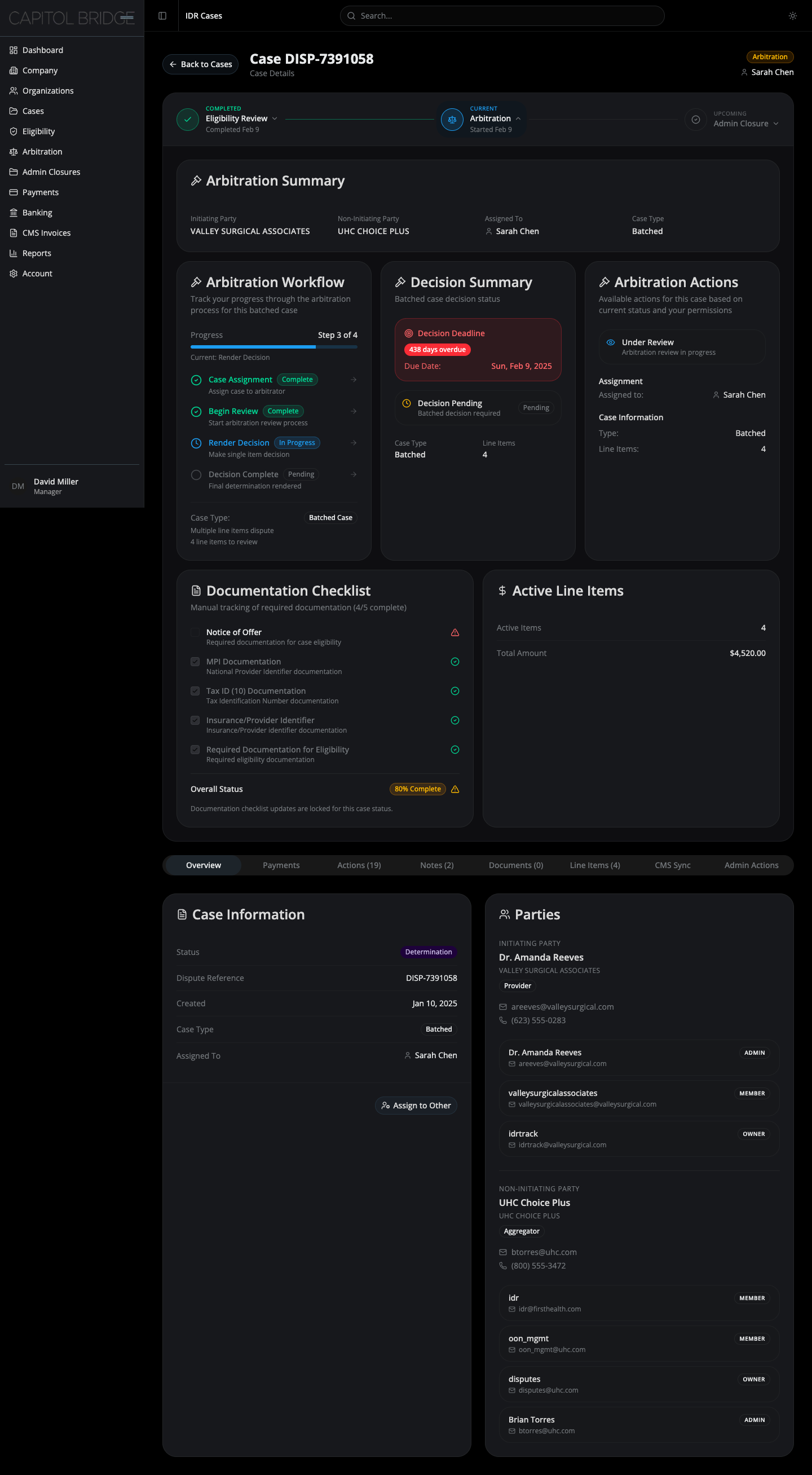
Section titled “What this enables”Clicking the Arbitration node opens an inline panel with the arbitration summary, three-column body (workflow / decision summary / actions), and a two-column footer that carries the locked Documentation Checklist alongside the active line items and disputed amount.
See it in the prototype
Section titled “See it in the prototype”case-2 → click Arbitration on the stepper.
Why it works this way
Section titled “Why it works this way”The panel mirrors arbitration-stage views from the live software. The footer row was added so closed arbitration cases carry the documentation snapshot and disputed amount on the case itself — no extra screen needed to confirm what the case held when arbitration ran.
Related documentation
Section titled “Related documentation”- Arbitration Panel — full layout, decision summary, locked checklist treatment
- Locked vs editable checklist items — why the footer checklist looks different