Case Balances
See it live: Case Balances
The problem
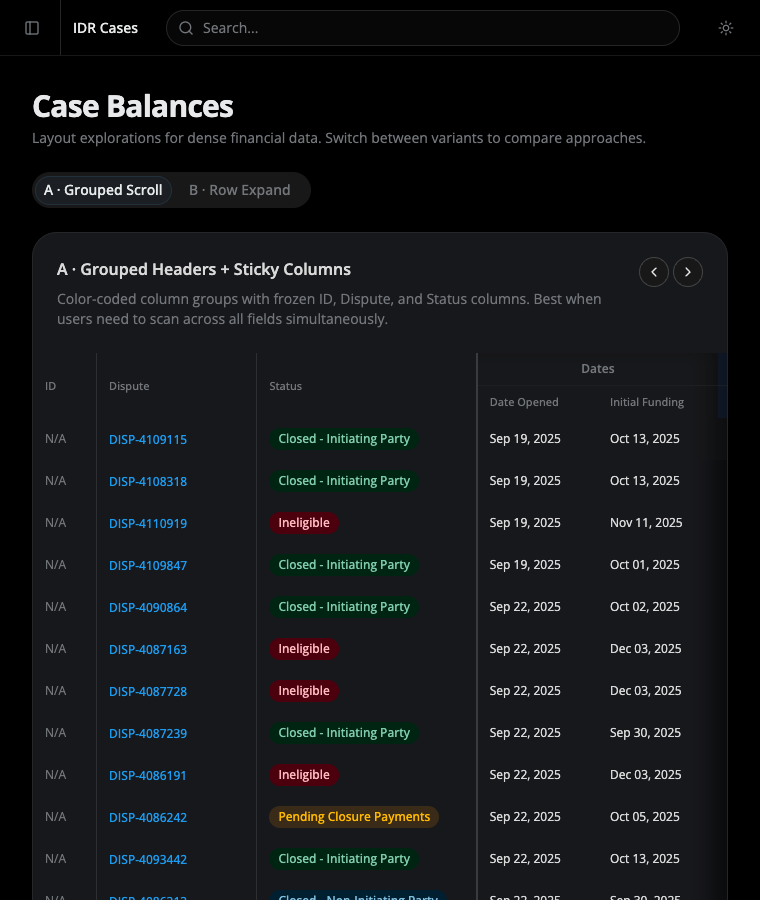
Section titled “The problem”The Case Balances view carries far more columns than a screen can hold: identity, two dates, three IP financial columns, three NIP financial columns, three totals, award and outgoing, three full payout records (company, amount, status each), and a variance. The original table solved this with a single horizontal scrollbar on the whole page — the identifying columns scrolled out of view, and the page body itself grew wider than the viewport.
The two approaches
Section titled “The two approaches”Two layout approaches are presented side by side as tabs, so the team can compare them against real workflows before committing. Both share the same mock dataset and the same status/payout styling.
| Variant | Approach | Best when |
|---|---|---|
| A · Grouped Scroll | One wide table with frozen identity columns and color-coded column groups | Users need to scan across all fields at once |
| B · Row Expand | A lean five-column summary table where each row expands to a full breakdown | Users scan the list first, then drill into specific cases |
Shared styling
Section titled “Shared styling”- Status badges reuse the portal’s status config where a status is known, with local fallbacks for balance-specific states (Pending Closure Payments, Closed - Default IP, Pending Administrative Closure).
- Payout status renders as a monospaced badge — emerald for
COMPLETED, amber forPENDING. - Amounts use tabular figures so columns of numbers align; missing values show an em dash.
- Both variants are tuned for light and dark mode — borders, dividers, tray backgrounds, and shadows each carry per-mode values so contrast holds in either theme.
Status
Section titled “Status”This is an exploration, not a finalized screen. The two variants exist to be compared. Variants C (master-detail split view) and D (card grid) were prototyped and removed once the team narrowed the field to these two.
See it in the prototype
Section titled “See it in the prototype”Case Balances → toggle between A · Grouped Scroll and B · Row Expand.