B · Row Expand
See it live: Case Balances → B · Row Expand tab
Overview
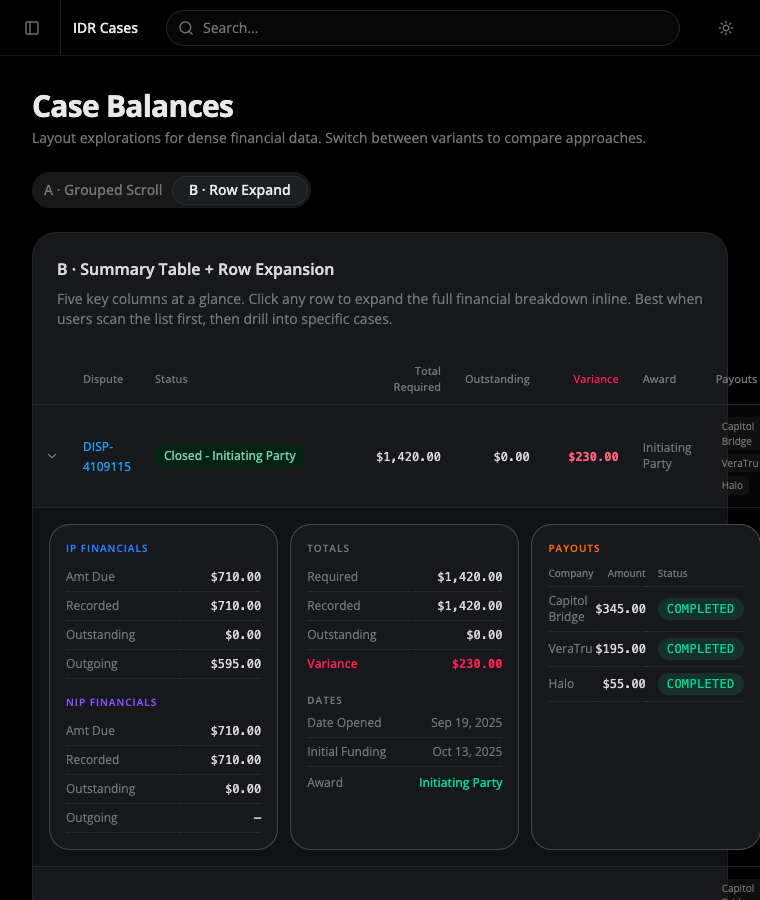
Section titled “Overview”A summary-first approach: show only what’s needed to scan the list, and reveal the rest on demand. Best when users scan the list first, then drill into specific cases. See the Case Balances overview for the problem this addresses and the alternative (A · Grouped Scroll).
Summary table
Section titled “Summary table”Each row shows five at-a-glance columns: Dispute, Status, Total Required, Outstanding, Variance, plus Award and a condensed Payouts list. Variance is tinted rose when non-zero so problem cases stand out during a scan.
Expanded breakdown
Section titled “Expanded breakdown”Clicking a row expands it inline into a darker tray holding three bordered cards:
- IP Financials / NIP Financials — Amt Due, Recorded, Outstanding, Outgoing for each party
- Totals & Dates — Required, Recorded, Outstanding, Variance, plus Date Opened, Initial Funding, and Award
- Payouts — a mini table of company, amount, and status per payout
Dividers inside the cards are dotted and low-contrast so they separate rows without competing with the data. The tray behind the cards is darker than the row to set the expanded region apart.