Stage Stepper
See it live: case-1 (Eligibility) · case-2 (Arbitration) · case-5 (Admin Closure)
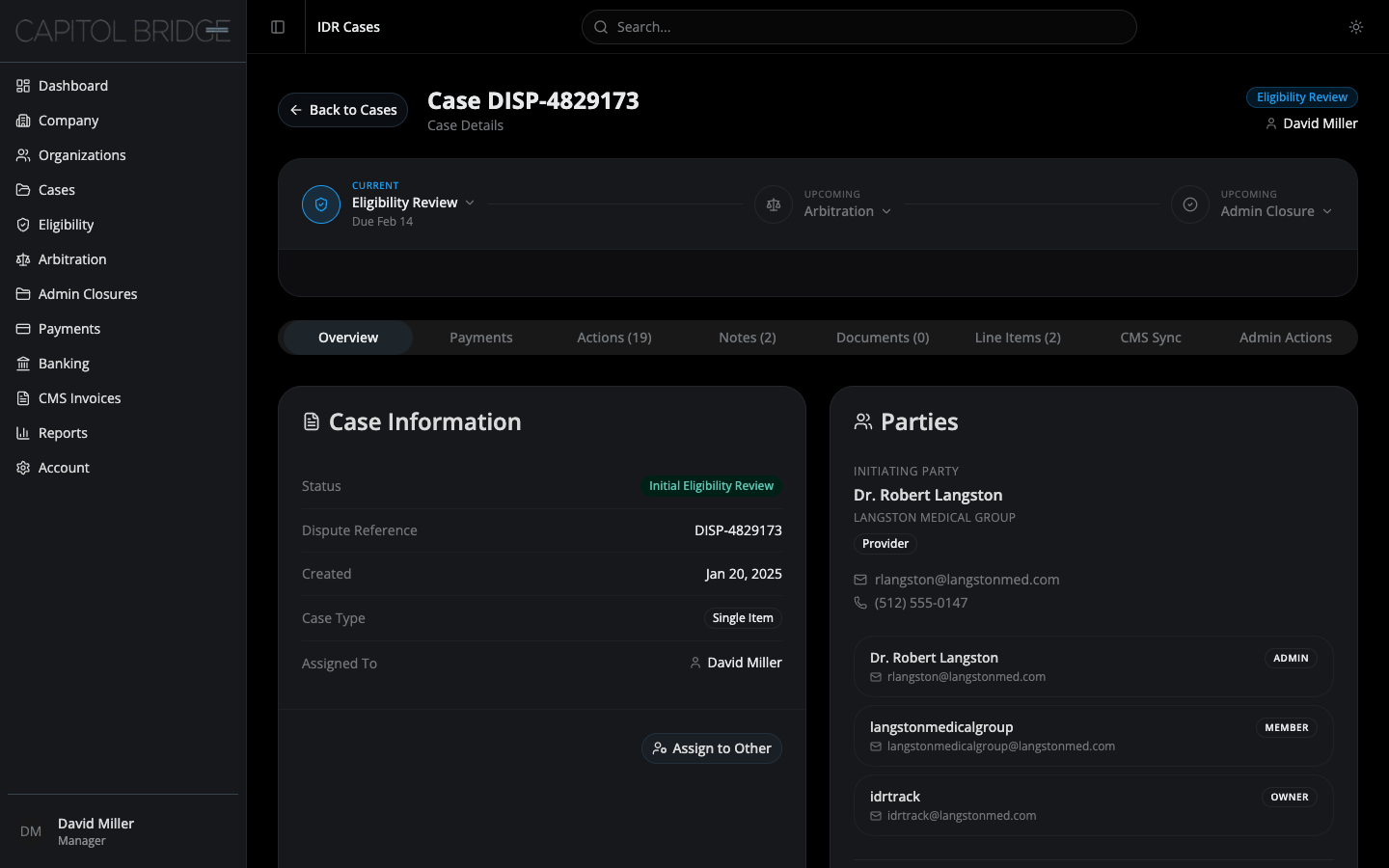
The three-stage model
Section titled “The three-stage model”The redesign commits to exactly three stages. These are the stages the user sees on the stepper, in the case header badge, in the search dropdown, and in the Cases table stage column.
| Stage | Color | Granular statuses rolled up |
|---|---|---|
| Eligibility Review | Primary (blue) | Initial Eligibility Review, Final Eligibility Review, Pending RFI |
| Arbitration | Amber | Determination, Final Determination |
| Admin Closure | Emerald | Closed — Initiating Party, Closed — Non-Initiating Party, Closed — Administrative, Closed — Split Decision, Ineligible, Completed, Payment Collection |
Granular status strings still exist on the Case Information card inside the Overview tab for reference. They do not drive navigation or the high-level badges.
The third stage was named Closed in the first pass and renamed to Admin Closure after client feedback. The new name communicates that there is a reconciliation record to review, not just an archived case.
Stepper layout
Section titled “Stepper layout”Three nodes with two connector lines between them. Sits directly under the case header inside its own card.
Node states
Section titled “Node states”| State | Indicator | Label |
|---|---|---|
| Complete | Emerald circle with check icon | Completed {date} |
| Current | Primary circle with stage icon | Due {dueDate} on Eligibility · Started {date} on Arbitration · Closed {date} on Admin Closure |
| Upcoming | Muted circle with stage icon | no timestamp |
Connectors are emerald when the preceding stage is complete, muted otherwise. The transition between complete and current stages is visible at a glance.
Expand affordance
Section titled “Expand affordance”Each node is a button with a chevron next to the stage name. The chevron rotates 180° when the panel is expanded.
Only reached stages are expandable. A case still in Eligibility Review cannot expand the Arbitration or Admin Closure nodes — there is no stage-specific content to show there yet. Upcoming nodes render as plain labels, not buttons.
Expansion behavior
Section titled “Expansion behavior”- Clicking a reached node opens its panel inside the same card as the stepper, below a thin horizontal divider.
- Only one panel can be open at a time.
- Clicking the currently-expanded node collapses it.
- Clicking a different reached node swaps the panel content.
Keeping the panel in the same container (rather than a separate card) signals that the stepper and the panel are one object. This was a deliberate choice during the redesign.
StageBadge coherence
Section titled “StageBadge coherence”A single StageBadge component renders the stage everywhere it appears:
- Top-right of the case detail header
- Stage column on the Cases table (renamed from the original “Status” column)
- Top bar search dropdown results
The three colors and labels are identical across all three surfaces so a reviewer who recognizes amber as “arbitration” in the header recognizes it as “arbitration” in the search dropdown.
Mock case distribution
Section titled “Mock case distribution”To demonstrate all three stages and all three panels in a review session, the 12 mock cases are distributed 4/4/4:
- Eligibility Review (4) — case-1, case-4, case-6, case-10
- Arbitration (4) — case-2, case-3, case-9, case-12
- Admin Closure (4) — case-5, case-7, case-8, case-11