Admin Closure Panel
See it live: case-5 → click Admin Closure
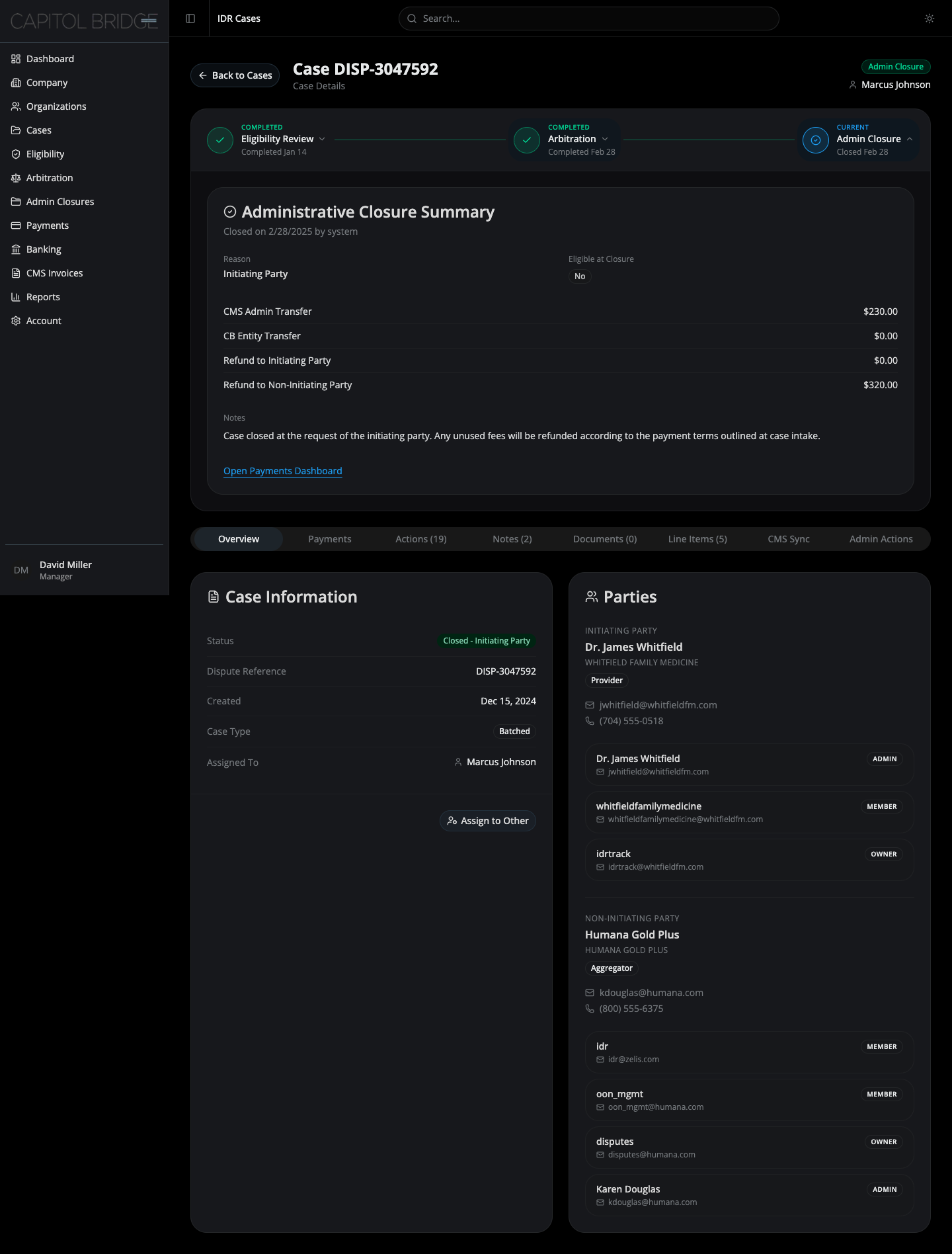
When it applies
Section titled “When it applies”A case shows the Admin Closure node as Current once its lifecycle has ended — decision rendered, withdrawn, settled, ineligible, or administratively closed. Granular statuses rolled up here include Closed — Initiating Party, Closed — Non-Initiating Party, Closed — Administrative, Ineligible, Completed, and Payment Collection.
Layout
Section titled “Layout”The panel renders a single full-width card: Administrative Closure Summary. Closed cases have no active workflow to track, so the three-column layout used by Eligibility and Arbitration would be noise. One card, one reconciliation record.
Card sections
Section titled “Card sections”Header
Section titled “Header”- Title: “Administrative Closure Summary”
- Subtitle:
Closed on {date} by {actor}— the actor is usuallysystemfor automated closures
Reason and eligibility
Section titled “Reason and eligibility”Two data cells in a grid:
- Reason — derived from the granular status. Examples: Early Resubmission, Initiating Party, Non-Initiating Party, Ineligible, Completed.
- Eligible at Closure — a badge with either
Yes(emerald) orNo(muted).Yesapplies when the case was completed or progressed to payment collection;Nootherwise.
Financial breakdown
Section titled “Financial breakdown”Four divided rows showing how fees were reconciled:
| Row | Meaning |
|---|---|
| CMS Admin Transfer | Funds transferred to CMS |
| CB Entity Transfer | Funds transferred to the Certified IDR Entity |
| Refund to Initiating Party | Refund owed to the initiating party |
| Refund to Non-Initiating Party | Refund owed to the non-initiating party |
Amounts are right-aligned, tabular, and formatted as USD. Zero values are shown explicitly as $0.00 rather than omitted so the reconciliation is always legible.
A muted label followed by a paragraph of closure-reason-specific explanation. The exact copy varies by reason — for example, an “Early Resubmission” closure reminds the reader that bundled disputes must be individually reported at the CPT level.
Footer link
Section titled “Footer link”A single inline text link: Open Payments Dashboard. This takes the user to the payments view for the case. It is a link rather than a button because the payment record is read-only reference material at this point in the lifecycle.