A · Grouped Scroll
See it live: Case Balances → A · Grouped Scroll tab
Overview
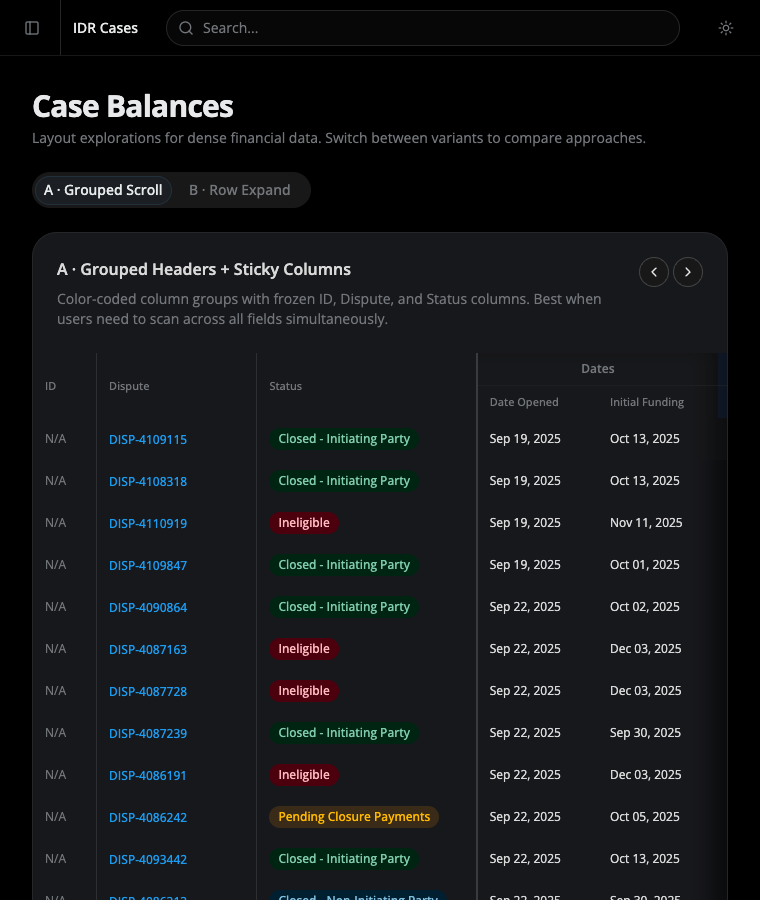
Section titled “Overview”A single dense table that keeps the identity columns in place while the financial columns scroll. Best when users need to scan across all fields at once. See the Case Balances overview for the problem this addresses and the alternative (B · Row Expand).
Frozen columns
Section titled “Frozen columns”ID, Dispute, and Status stay pinned to the left as the rest of the table scrolls horizontally. The Status column carries a divider on its right edge marking the boundary between the frozen zone and the scrolling zone.
The freeze is implemented with position: sticky columns and a fixed table layout (table-layout: fixed plus a <colgroup>) so the sticky offsets always line up with the rendered column widths — no content bleeds through the frozen cells while scrolling.
Column groups
Section titled “Column groups”Related columns are banded under a shared header with a tint to make the structure legible while scrolling:
| Group | Columns | Tint |
|---|---|---|
| Dates | Date Opened, Initial Funding | neutral |
| IP Financials | Amt Due, Recorded, Outstanding | blue |
| NIP Financials | Amt Due, Recorded, Outstanding | violet |
| Totals | Required, Recorded, Outstanding | neutral |
| Award & Outgoing | Award, IP Out, NIP Out | emerald |
| Payout 1–3 | Company, Amt, Status (×3) | orange |
| Variance | Variance | rose |
Scroll affordances
Section titled “Scroll affordances”Two cues tell the user there is more to the right:
- A soft inset shadow on the right edge of the table fades the content, hinting at the scroll boundary.
- Left / right arrow buttons in the top-right of the card scroll the table by a fixed step with smooth animation.