Arbitration Panel
See it live: case-2 → click Arbitration
When it applies
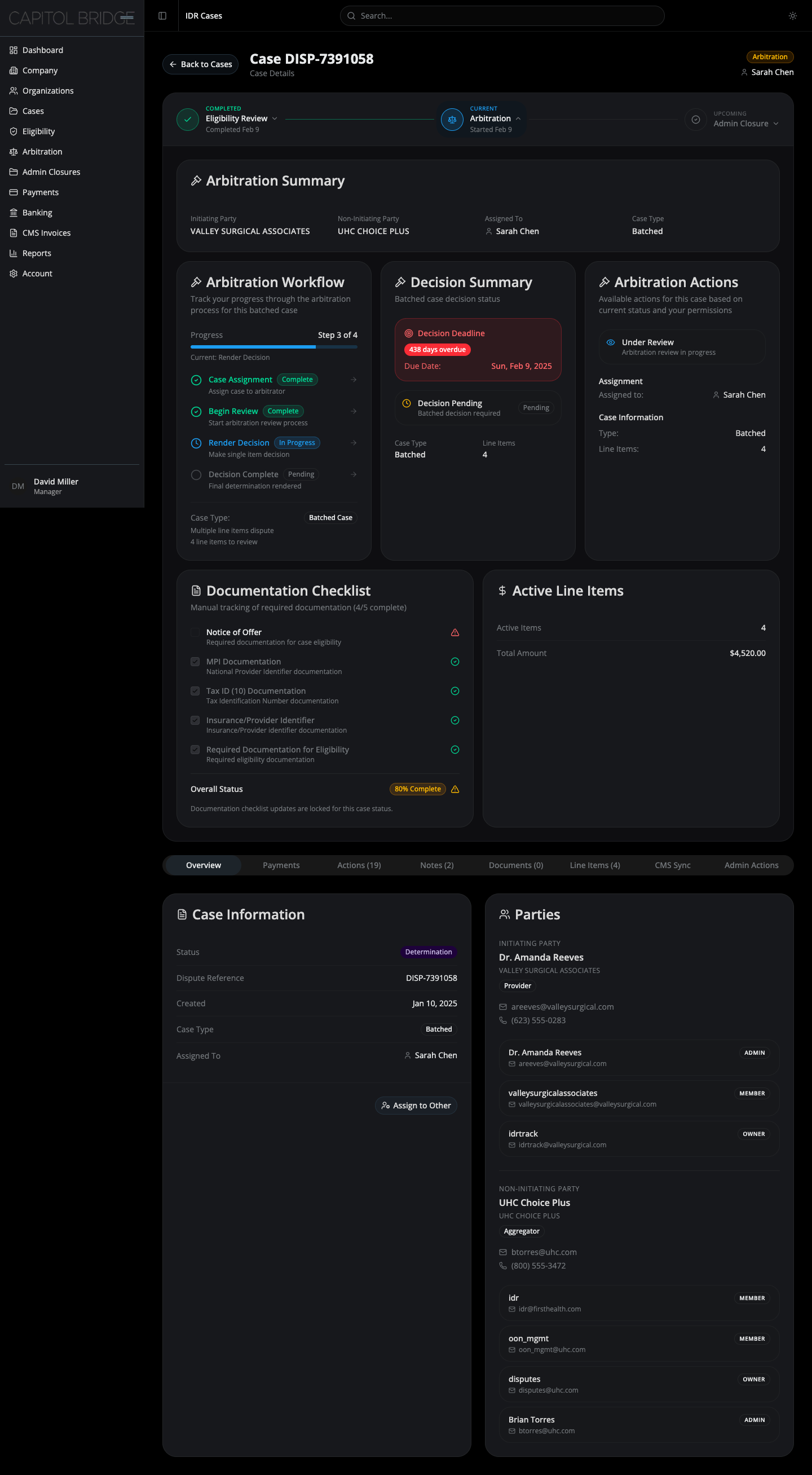
Section titled “When it applies”A case shows the Arbitration node as Current while its granular status is Determination or Final Determination. The panel surfaces the arbitration workflow, the decision status, deadlines, and a locked snapshot of the documentation and line items that carried over from eligibility.
Layout
Section titled “Layout”Inside the same card as the stepper:
- Arbitration Summary — full-width card
- Three-column body:
- Arbitration Workflow
- Decision Summary
- Arbitration Actions
- Two-column footer:
- Documentation Checklist (locked)
- Active Line Items
Arbitration Summary
Section titled “Arbitration Summary”Four cells: Initiating Party, Non-Initiating Party, Assigned To (person icon + name), Case Type.
Arbitration Workflow
Section titled “Arbitration Workflow”Four-step vertical checklist:
- Case Assignment — arbitrator assigned
- Begin Review — review started
- Render Decision — decision being drafted
- Decision Complete — final determination rendered
Each step shows its state icon, label, and status pill (Complete / In Progress / Pending). A right-pointing chevron sits at the end of each row to convey sequence. A progress bar and “Step X of 4” counter sit above the list.
Decision Summary
Section titled “Decision Summary”A red-bordered banner at the top surfaces the decision deadline and, if applicable, a “X days overdue” pill. Below it, a status row shows whether the decision is pending or rendered. A two-cell grid at the bottom restates case type and line-item count.
Arbitration Actions
Section titled “Arbitration Actions”Reference-only status for the case: an “Under Review” callout, the assignment row, and case info (type + line items).
No action buttons. The “Available Actions” button list was removed here for the same reason as in the Eligibility panel — the expandable is reference-and-status only.
Documentation Checklist (locked)
Section titled “Documentation Checklist (locked)”Same shape as the Eligibility panel’s checklist, with locked visual treatment:
- Checkbox fill is muted gray (not primary blue)
- Opacity reduced to 60%
- Label text switches from primary to muted-foreground when uploaded
- Footer message: “Documentation checklist updates are locked for this case status.”
The lock is intentional: the case has moved past eligibility and documentation updates are no longer meaningful. The client flagged that fully-saturated blue checkboxes looked interactive even when they weren’t, which led to the muted treatment.
Active Line Items
Section titled “Active Line Items”Two divided rows in a compact card:
- Active Items — count of line items currently in review
- Total Amount — sum of their disputed amounts, formatted as USD with tabular-aligned numerals
Why the footer row exists
Section titled “Why the footer row exists”Closed arbitration cases in the live software show two additional cards — a locked documentation checklist and an active line items summary. These were added as a two-column footer row inside the same panel so arbitration cases carry that final snapshot without a separate screen.